Know What to Patch, and Why the Rest Has No Fix
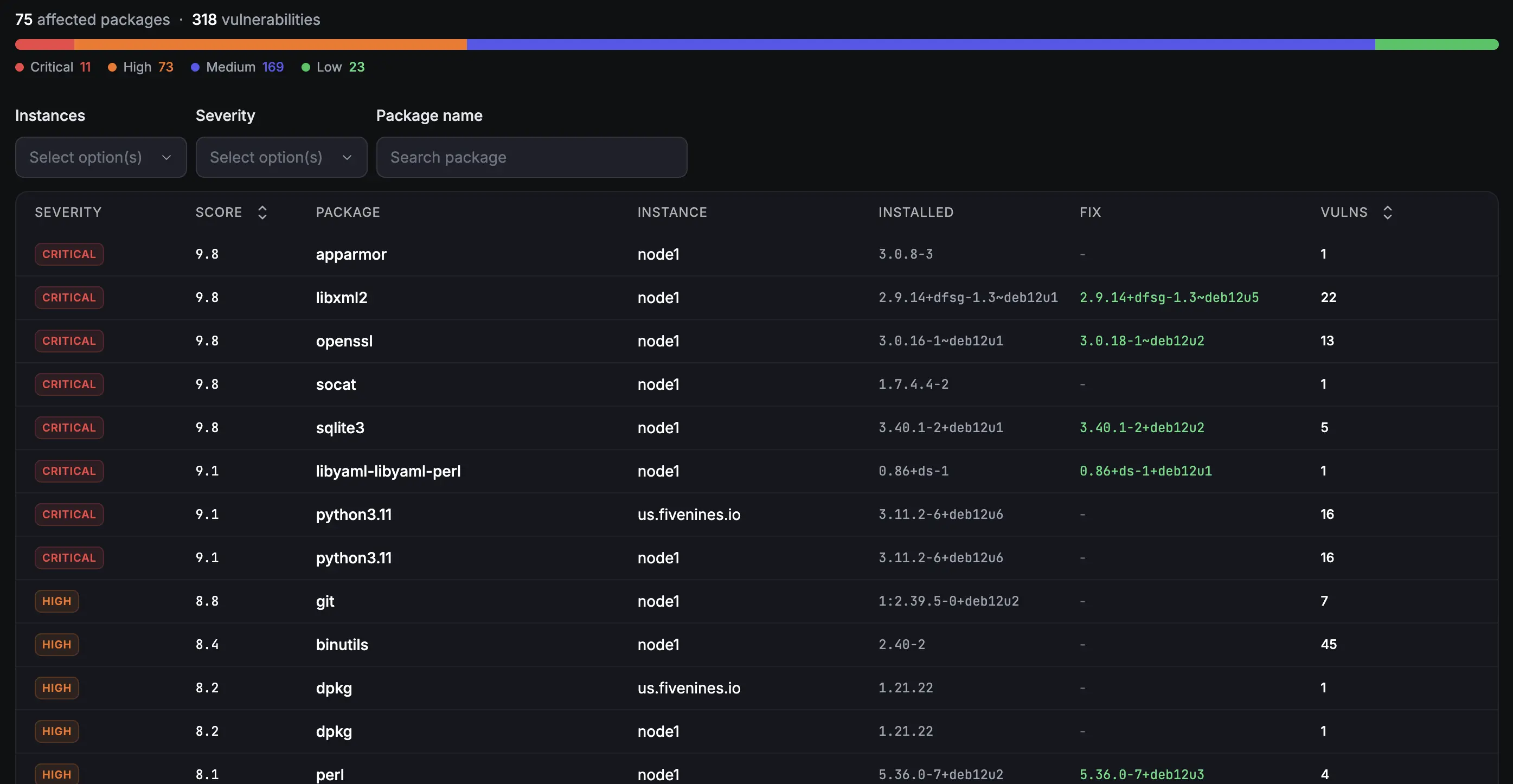
Most scanners hand you a wall of red and leave you to work out which of it you can act on. Fivenines separates the CVEs you can fix today from the ones your distro has not patched yet, and tells you what the vendor actually said about each one.
Built for teams monitoring production infrastructure
No credit card · 2-minute setup
-
A Work Queue, Not a Count
The headline number counts packages with an available fix - the number you can drive to zero. CVEs with no upstream patch are listed separately, so a well-maintained fleet actually reads as maintained.
-
Vendor Fix Verdicts
When there is no patch, the finding says why in the vendor's own words: under investigation, will not fix, fix deferred, end of life. Sourced from Canonical, Debian and Red Hat security data.
-
Hosts and Container Images
Scans installed packages on the host and the OS packages inside your Docker images - including images whose containers are stopped and never started again.
Deep dive
Vendor Verdicts: Why There Is No Patch
A CVE with no fix version is not the same as a CVE nobody has looked at. Fivenines pulls fix-state statements daily from three vendor sources - Canonical (Ubuntu, OpenVEX), the Debian security tracker, and Red Hat CSAF - and attributes each finding to the vendor that made the call.
Instead of an unexplained red row you get Canonical: under investigation, Debian: will not fix, or Red Hat: fix deferred, with the vendor's own note quoted verbatim. Red Hat verdicts are inherited by AlmaLinux and Rocky Linux, which rebuild RHEL but publish no triage of their own.
Only a vendor can quiet a finding. A verdict of not affected or will not fix is stored with its attribution or not at all, and if a vendor feed goes stale for more than seven days its verdicts stop applying and the page tells you so. Silence is never read as good news.
Deep dive
Patchable Work, Separated From Exposure
Every finding lands in one of four buckets, and the split is the point. Patchable is work: a fix exists in a channel you already have. Requires subscription is a real fix published only behind a paid channel such as Ubuntu Pro or ESM - actionable, but not by running apt. No fix available is exposure that needs compensating controls rather than patching. Vendor cleared is what a vendor has explicitly ruled out.
Folding those together produces a number that only ever grows, no matter how well you maintain a fleet, because unfixed CVEs accumulate and no patch removes them. Fivenines counts the work queue in the headline and states the rest on its own line - including how many of the unfixable findings are high or critical, so a quiet grey number can never hide a serious exposure.
If you already pay for the channel, the fix is work, not a purchase. The agent reports whether an Ubuntu host is attached to Ubuntu Pro and which services are enabled, and a fix published in a pocket one of those services opens moves into the patchable queue instead of sitting in the subscription bucket. It is decided per pocket rather than per machine, so esm-infra does not unlock a FIPS-only fix. A host that has not reported its attachment keeps the cautious answer - the fix stays listed as needing a subscription, which is what it is until we know otherwise.
Deep dive
Container Images, Not Just the Host
A patched host running a two-year-old base image is not a patched system. Once Docker monitoring is on, Fivenines discovers every image your containers reference and scans the OS packages inside it - Debian, Ubuntu and Alpine layers today.
Images are scanned per image digest, per organization, so fifty hosts running one image is one scan and one row, and the affected hosts fall out of the container data you are already sending. Stopped containers count: the image is still on disk and still ships whatever it shipped.
An image we could not read is never rendered as clean. Images without a completed scan get their own list, labelled as exactly that, because an absent result is not a zero.
Every plan sees its own severity summary and counts. Pro and above unlocks the per-package view, fix versions, vendor verdicts and container image scanning.
Works With Every Major Distro
apt
Debian, Ubuntu, Raspbian, Linux Mint
yum / dnf
RHEL, CentOS, AlmaLinux, Rocky Linux, Amazon Linux 2 and 2023
apk
Alpine Linux
pacman
Arch Linux, Manjaro, EndeavourOS
Deep dive
Binary Packages Matched to the Right Advisory
Debian, Ubuntu and Alpine publish advisories against the source package - openssl - while your server or image has binary packages installed - libssl3t64 on Ubuntu, libcrypto3 on Alpine. A scanner that matches on name alone silently misses those, with no error and no gap indicator.
Fivenines maintains a binary-to-source map rebuilt nightly from the Debian, Ubuntu and Alpine archives, so an installed binary resolves to the source package its advisories are filed under. On current Debian and Ubuntu releases the majority of installed packages carry a binary name that differs from their source, which is coverage a name-only match does not have.
How It Works
Step 1
Install the agent
Step 2
Packages are read, not probed
The agent reads the package list your package manager already maintains and sends names and versions. No source scanning, no network probing, no filesystem crawl.
Step 3
Findings are matched and annotated
Versions are matched against OSV advisories, then each finding is annotated with the vendor's current fix-state verdict. Advisory data refreshes twice daily and vendor verdicts daily, so a newly published CVE reaches your fleet without a re-scan on your side.
Step 4
Patch the queue, track the rest
The work queue tells you which packages to update and to which version. Everything unfixable is listed separately with the vendor's reason, ready to route to email, Slack, or any channel you already use.
Vulnerability detail is included on Pro and above
14-day free trial, no credit card.
Frequently Asked Questions
How does Fivenines detect package vulnerabilities, and where does the CVE data come from? +
What is a vendor fix verdict? +
Why does the headline count fewer vulnerabilities than my total CVE count? +
Does Fivenines scan Docker container images? +
Can I get alerts when new vulnerabilities are found? +
Explore next
Related Features
Docker Monitoring
Container metrics and state, and the inventory that drives container image scanning.
Explore ->Server Alerts
Get notified via email, Slack, Telegram, or any channel when a new vulnerability lands.
Explore ->Custom Dashboards
Build dashboards to visualize vulnerability trends and security posture across your fleet.
Explore ->Cron Job Monitoring
Make sure your scheduled security patches and maintenance tasks actually run.
Explore ->See how Fivenines compares to other tools
Read our guide to the best infrastructure monitoring tools in 2026.
Start monitoring vulnerabilities in 2 minutes
14-day trial. No credit card required.
No credit card · 2-minute setup · Cancel anytime